

In the ecosystem of programming tools, we have been observing a certain stagnation for years. The market has been almost entirely dominated by solutions based on Electron technology (such as VS Code) or environments based on the JVM (the JetBrains family of IDEs). Although these tools offer powerful capabilities, they carry the baggage of high resource consumption and noticeable delays. In this context, the appearance of the Zed editor is not just the premiere of another code-writing application – it is an attempt to redefine how responsive a modern developer's working environment can be.
Zed's atomic lineage
Behind the Zed project are people who know almost everything about editors. Nathan Sobo, the creator of Atom (the first widely adopted Electron editor), together with his team, drew lessons from the limitations of web technologies in desktop applications. They decided to create a tool from scratch, rejecting the layers of abstraction that slow down modern IDEs.
Zed is a relatively young project, but one developing at an impressive pace. Instead of building yet another "fork" of existing solutions, the authors opted for an original approach to architecture, which allowed them to eliminate the problems VS Code has struggled with for years.
The advantages of Zed
The speed of Rust
The key to Zed's performance is Rust. The choice of this language was dictated not by fashion, but by the need for full control over memory and concurrency. However, the biggest innovation is GPUI – an original framework for rendering the interface using the graphics processor (GPU).
In practice, this means that Zed renders the interface in a similar way to modern video games. While other editors struggle with delays of tens of milliseconds on every keystroke, Zed responds almost instantly. This "night and day" difference is particularly visible in large projects, where operations such as code formatting by Prettier or static analysis by ESLint run in the background without the slightest impact on the smoothness of scrolling through the text.
An easy switch from VS Code and Webstorm
One of Zed's greatest advantages is its intuitiveness for people accustomed to market standards. The creators took care of high interoperability:
- Configuration logic: As in VS Code, we define settings in readable
.jsonfiles. This gives full control and makes it easy to move configurations between machines. - Keyboard shortcuts: Key mapping is natural, which means switching from Webstorm or VS Code does not require weeks of learning new habits.
- Visual minimalism: The interface is extremely lightweight. The absence of unnecessary distractions and "visual noise" allows you to fully focus on the architecture of the solution being written.
Convenient collaboration with AI
In the age of AI, Zed stands out with its well-thought-out integration with language models. It does not impose a single path, but promotes the BYOK (Bring Your Own Key) approach. We can easily connect our own API keys to models from Anthropic (Claude) or OpenAI, which gives full control over costs and privacy.
Importantly, Zed natively communicates with agent daemons installed in the system, such as GitHub Copilot or OpenCode. This integration is deep and stable, and the absence of the Electron environment overhead means that suggestions generated by AI appear faster than in competing solutions.
A handful of criticism
To be fair, it should be mentioned that Zed is still a maturing application. Although stability is at a very high level, minor bugs do occur – for example, the need to restart the application for some configuration changes to be applied correctly.
The biggest challenge for new users may be the ecosystem. The base of plugins and extensions is much poorer than in the case of VS Code, which has a marketplace built over a decade. However, it is worth noting that when it comes to support for the most popular programming languages and DSLs (Domain Specific Languages), Zed offers everything necessary for professional work.
There is also no native settings synchronisation via a user account, which forces manual management of configuration files.
My current workflow in Zed
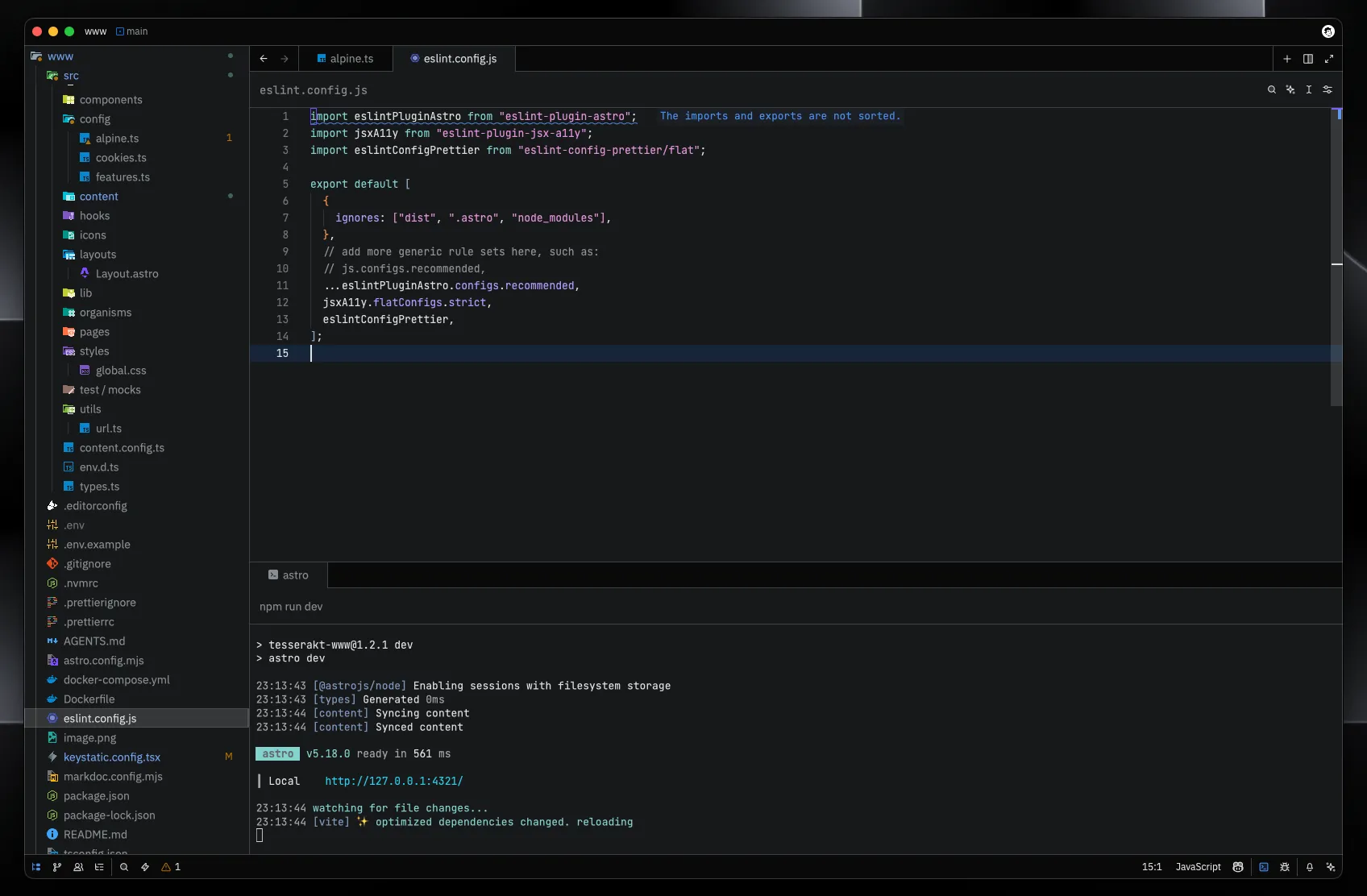
Testing Zed in everyday work at Tesserakt, I have developed a setup that combines aesthetics with maximum productivity:
- Aesthetics: I use the "Fleet" theme, which imitates the style of the now-discontinued editor from JetBrains. Combined with the Material Icons package, the interface looks modern and clear.
- Typography: JetBrains Mono remains my standard – a font designed with code readability in mind.
- Terminal: I gave up external terminal emulators in favour of the one built into Zed. It is extremely responsive and handles the rendering of complex logs brilliantly.
- AI: I have Copilot and OpenCode integrations connected, which allows me to iterate quickly on code with the support of LLMs.
It's worth following the project's development
Zed is a breath of fresh air that the development industry badly needed. In the flood of yet more VS Code forks, we received a tool built with engineering precision, putting performance first.
The project is developing very dynamically, and the team responds instantly to community reports. The collaborative coding features (based on CRDT) also look promising, and could soon revolutionise pair programming. The upcoming 1.0 version will certainly be the moment when many developers seriously consider changing their main working tool. At Tesserakt we will certainly be watching this development closely.


